
현재 티켓핑은 대기열 관리를 비롯해 좌석 선점, 인증 정보 등 많은 서비스에서 Redis를 사용하고 있는 만큼 의존성이 크다. 그 말은 즉, Redis 서버에 이상이 생겼을 때 서비스 전체에 문제가 생긴다는 것을 뜻하는데..
1. High Availability와 Failover
고가용성(HA)은 시스템에서 최소한의 다운타임으로 지속적으로 운영될 수 있는 능력을 의미한다. 일반적으로 서버와 데이터베이스를 여러 대 운용하여 단일 실패 지점을 없애서, 한 서버에 장애가 발생하더라도 서비스가 중단되지 않도록 설계해야 한다.
Failover는 시스템이나 구성 요소가 실패했을 때 자동으로 대체 시스템이나 구성 요소로 전환하는 과정을 말한다. 즉, Failover는 고가용성을 구현하는 방법 중 하나로 다음의 방식이 존재한다.
- 자동 페일오버: 장애가 발생하면 시스템이 자동으로 다른 정상 작동 중인 서버나 서비스로 전환
- 수동 페일오버:관리자가 장애를 인지하고 수동으로 다른 시스템으로 전환
대규모 시스템의 경우 동시에 여러 곳에서 장애가 발생할 수도 있어, 자동으로 페일오버할 수 있어야 한다. 이에 티켓핑의 Redis 서버가 장애가 생겨도 사용자들이 중단 없이 서비스를 이용할 수 있도록 할 수 있는 자동 Failover 방식을 도입하기로 한다.
2. Redis의 Failover
Redis의 자동 페일오버 기능을 지원하는 방법에는 Sentinel과 Cluster가 존재한다.
2.1. Sentinel
Sentinel은 마스터-슬레이브 구조를 가지며 마스터의 장애를 감지하게 되면, 슬레이브를 새로운 마스터로 승격키기게 된다.
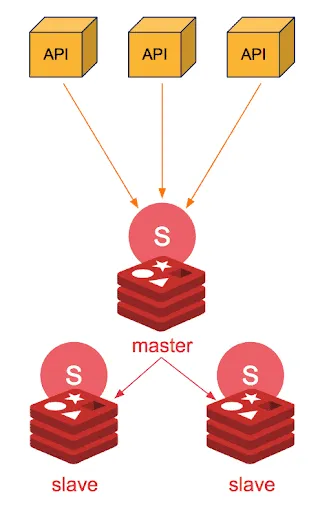
장점
- 구성이 비교적 단순하고 운영이 쉬움
단점
- 수평적 확장 제한적임
- 모든 쓰기 작업이 마스터에서만 가능
- 데이터 샤딩 지원 안함
- Sentinel 자체가 단일 실패 지점이 될 수 있음
2.2. Cluster
Cluster 역시 마스터-슬레이브 구조를 가지지만 Sentinel과 달리 여러 대의 마스터 노드가 존재한다. 각 마스터는 특정 데이터 샤드를 책임지며, 클러스터의 데이터를 분산 저장한다.
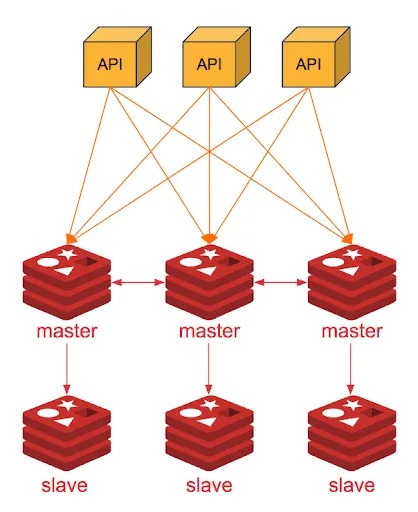
장점
- 자동 샤딩을 통한 수평적 확장 가능
- 대규모 데이터 처리 가능
- 노드 간 자동 데이터 재분배
- 여러 마스터 노드에 쓰기 가능
단점
- 구성과 운영이 복잡함
- 클라이언트가 클러스터 모드를 지원해야 함
- 메모리 오버헤드가 더 큼
- 일부 Redis 명령어 사용 제한
- 트랜잭션이 단일 샤드로 제한됨
선택 - Cluster
현재 티켓핑의 경우 공연장의 좌석 정보를 캐시에 저장하여, 조회가 이루어지고 있다. 공연이 새로 추가될 때마다 많은 데이터가 추가되야 하므로 수평적 확장을 지원해야 한다. 따라서 수평적 확장에 용이하고 자동 페일오버를 지원하는 Cluster를 도입하기로 한다.
3. Cluster 구축하기
우선 Docker Compose를 통해 간편하게 Cluster를 구성하는 방법을 알아보자.
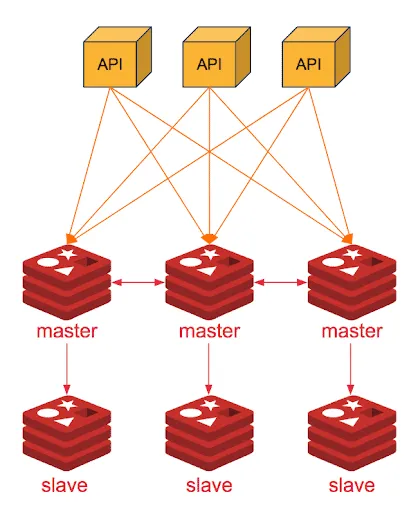
우선 컴포즈 파일은 그림과 같이 3개의 마스터(7001~7003)와 3개의 레플리카(7004-7006)로 이루어지게 구성하였다. 클러스터의 모든 노드들은 같은 네트워크를 공유해야 하는데, 여기서는 임의로 master 1의 네트워크를 공유하도록 하였다.
docker-compose.yml
version: "3.1"
services:
  redis-master-1:
    container_name: redis-master-1
    image: redis:latest
    command: >
      redis-server --port 7001
      --cluster-enabled yes
      --cluster-config-file node.conf
      --cluster-node-timeout 5000
      --appendonly yes
    ports:
      - "7001:7001"
      - "7002:7002"
      - "7003:7003"
      - "7004:7004"
      - "7005:7005"
      - "7006:7006"

  redis-master-2:
    network_mode: "service:redis-master-1"
    container_name: redis-master-2
    image: redis:latest
    command: >
      redis-server --port 7002
      --cluster-enabled yes
      --cluster-config-file node.conf
      --cluster-node-timeout 5000
      --appendonly yes

  redis-master-3:
    network_mode: "service:redis-master-1"
    container_name: redis-master-3
    image: redis:latest
    command: >
      redis-server --port 7003
      --cluster-enabled yes
      --cluster-config-file node.conf
      --cluster-node-timeout 5000
      --appendonly yes

  redis-replica-1:
    network_mode: "service:redis-master-1"
    container_name: redis-replica-1
    image: redis:latest
    command: >
      redis-server --port 7004
      --cluster-enabled yes
      --cluster-config-file node.conf
      --cluster-node-timeout 5000
      --appendonly yes

  redis-replica-2:
    network_mode: "service:redis-master-1"
    container_name: redis-replica-2
    image: redis:latest
    command: >
      redis-server --port 7005
      --cluster-enabled yes
      --cluster-config-file node.conf
      --cluster-node-timeout 5000
      --appendonly yes

  redis-replica-3:
    network_mode: "service:redis-master-1"
    container_name: redis-replica-3
    image: redis:latest
    command: >
      redis-server --port 7006
      --cluster-enabled yes
      --cluster-config-file node.conf
      --cluster-node-timeout 5000
      --appendonly yes

  redis-cluster-entry:
    network_mode: "service:redis-master-1"
    image: redis:latest
    container_name: redis-cluster-entry
    command: >
      redis-cli --cluster create
      127.0.0.1:7001 127.0.0.1:7002 127.0.0.1:7003
      127.0.0.1:7004 127.0.0.1:7005 127.0.0.1:7006
      --cluster-replicas 1
      --cluster-yes
    depends_on:
      - redis-master-1
      - redis-master-2
      - redis-master-3
      - redis-replica-1
      - redis-replica-2
      - redis-replica-3

networks:
  redis:
    driver: bridge
각 노드들의 설정은 다음과 같다.
redis-server --port 7001
  --cluster-enabled yes         # 클러스터 모드 활성화
  --cluster-config-file node.conf  # 클러스터 설정 파일
  --cluster-node-timeout 5000   # 노드 타임아웃 (5초)
  --appendonly yes  # 데이터 지속성을 위한 AOF 활성화
클러스터 설정용 entrypoint 컨테이너는 다음의 명령어를 실행하게 되는데, 마스터당 1개 씩의 레플리카가 할당 될 것이다.
redis-cli --cluster create
127.0.0.1:7001 127.0.0.1:7002 127.0.0.1:7003
127.0.0.1:7004 127.0.0.1:7005 127.0.0.1:7006
--cluster-replicas 1     # 마스터당 1개의 레플리카 할당
--cluster-yes   # 자동으로 yes 응답
이제 클러스터 모드가 잘 적용되었는지 테스트를 해보도록 하자.
테스트
docker-compose up
먼저 엔트리 포인트 컨테이너 로그를 확인해보자.
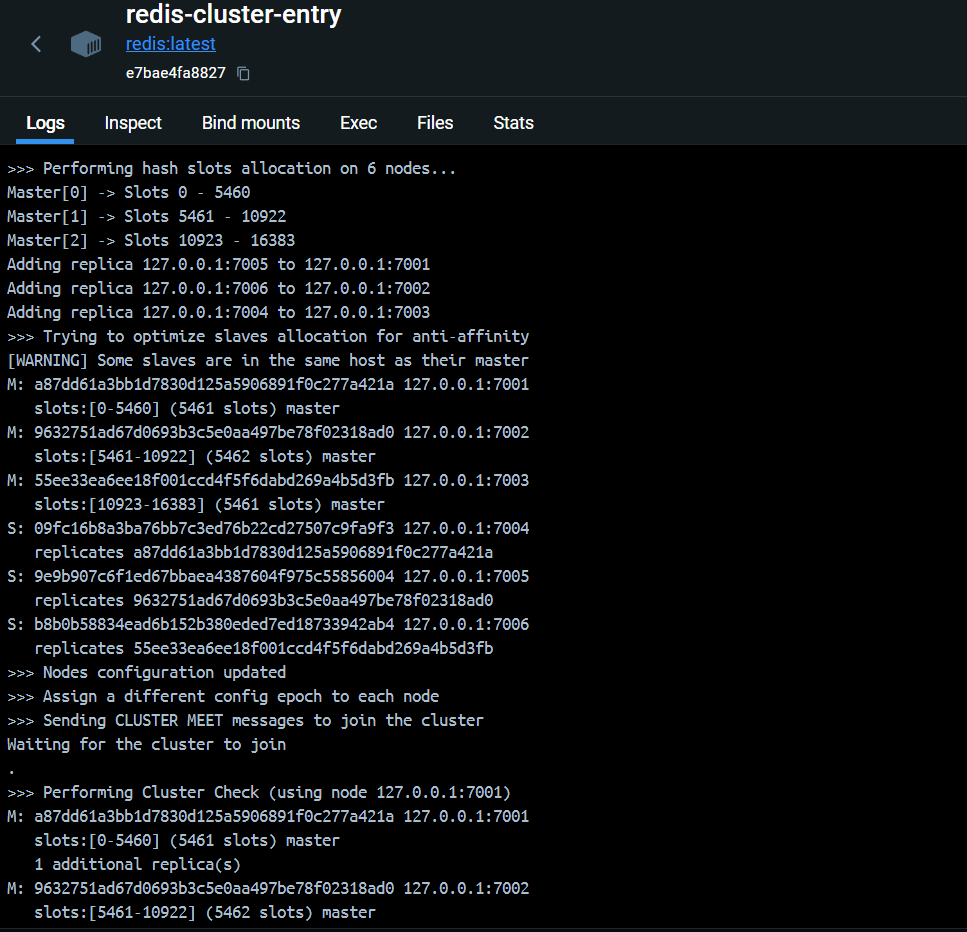
전체 16384개의 슬롯을 3개 마스터에 균등 분배하므로 각 마스터 노드들은 약 5461개의 슬롯을 배정받게 된다.
>>> Performing hash slots allocation on 6 nodes...
Master[0] -> Slots 0 - 5460
Master[1] -> Slots 5461 - 10922
Master[2] -> Slots 10923 - 16383
또한 설정에 따라 레플리카 노드들은 각 마스터 노드에 연결된다.
>>> Performing Cluster Check (using node 127.0.0.1:7001)
M: a87dd61a3bb1d7830d125a5906891f0c277a421a 127.0.0.1:7001
   slots:[0-5460] (5461 slots) master
   1 additional replica(s)
M: 9632751ad67d0693b3c5e0aa497be78f02318ad0 127.0.0.1:7002
   slots:[5461-10922] (5462 slots) master
   1 additional replica(s)
S: 09fc16b8a3ba76bb7c3ed76b22cd27507c9fa9f3 127.0.0.1:7004
   slots: (0 slots) slave
   replicates a87dd61a3bb1d7830d125a5906891f0c277a421a
S: b8b0b58834ead6b152b380eded7ed18733942ab4 127.0.0.1:7006
   slots: (0 slots) slave
   replicates 55ee33ea6ee18f001ccd4f5f6dabd269a4b5d3fb
M: 55ee33ea6ee18f001ccd4f5f6dabd269a4b5d3fb 127.0.0.1:7003
   slots:[10923-16383] (5461 slots) master
   1 additional replica(s)
S: 9e9b907c6f1ed67bbaea4387604f975c55856004 127.0.0.1:7005
   slots: (0 slots) slave
   replicates 9632751ad67d0693b3c5e0aa497be78f02318ad0
[OK] All nodes agree about slots configuration.
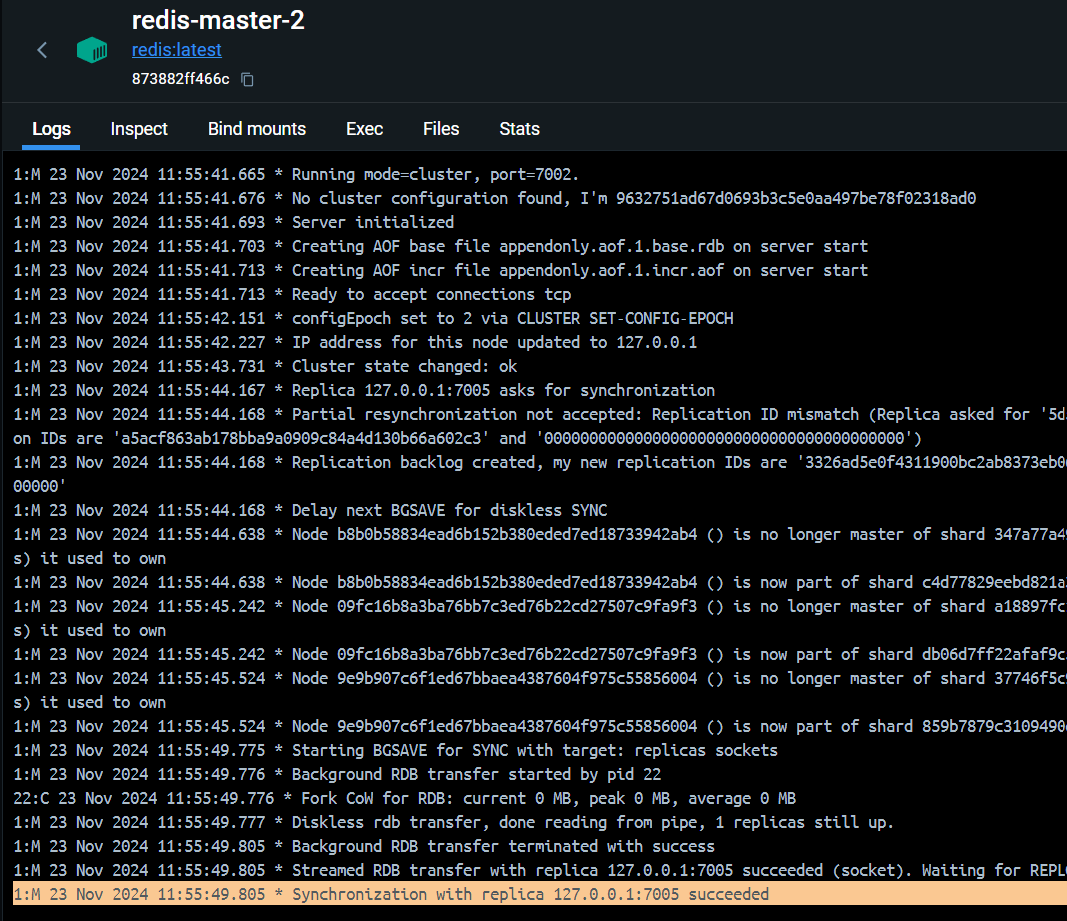
마스터2 노드 컨테이너 로그 확인 시에 다음과 같이 7005 포트의 레플리카2 노드가 배정됨을 확인할 수 있다.
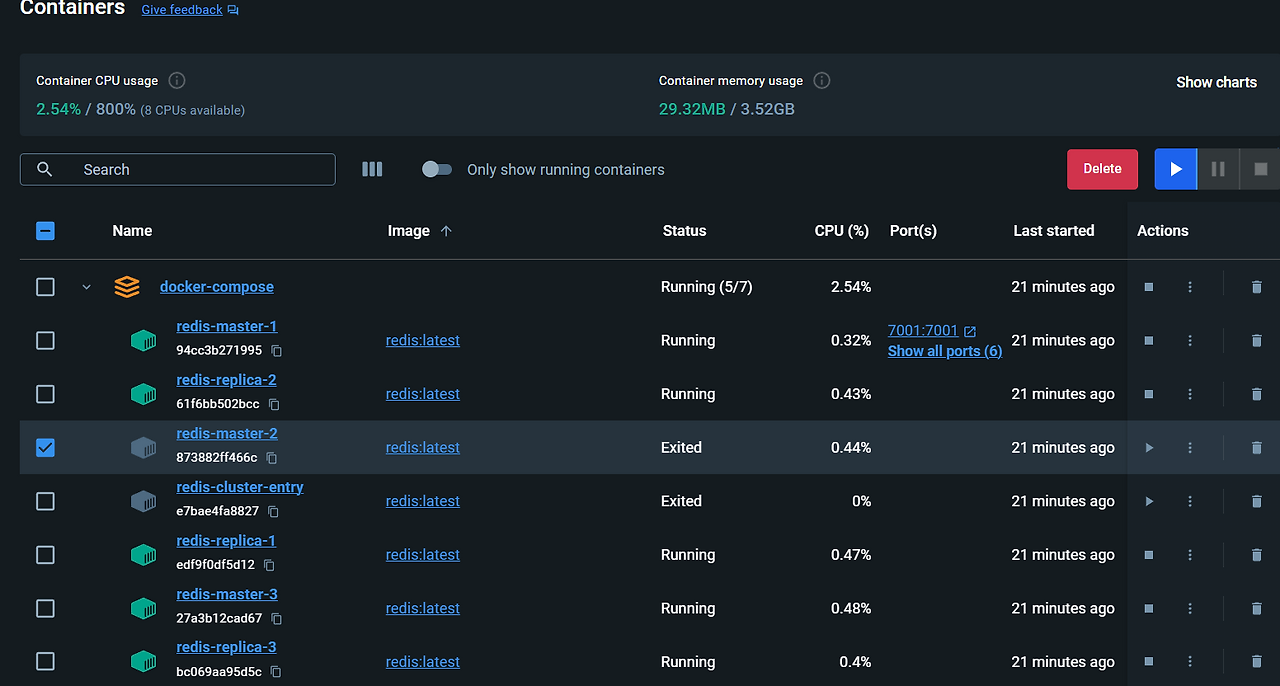
만약 여기서 마스터2 노드에 문제가 생겼다고 가정하고 컨테이너 종료를 하게 되면..
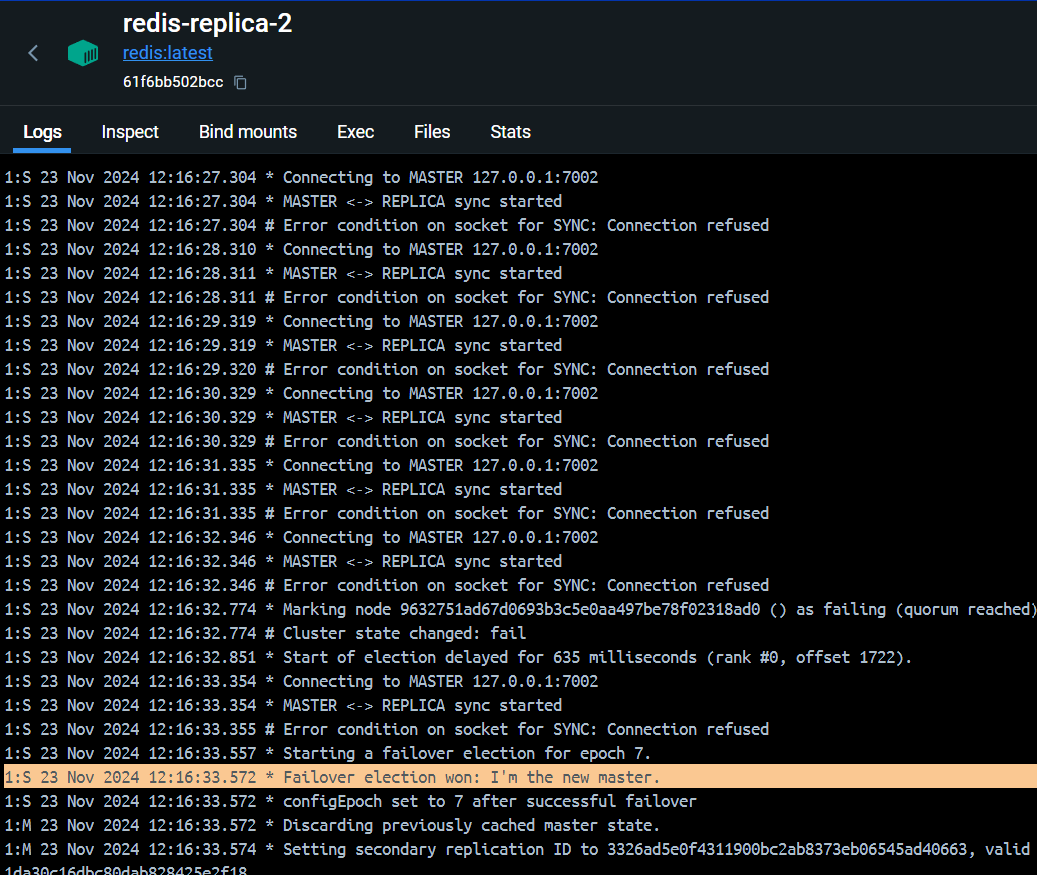
다음과 같이 레플리카2 노드가 자동으로 마스터로 승격되는 것을 확인할 수 있다.
4. Spring Boot 설정
마지막으로 Spring에서 Lettuce와 Redisson 클라이언트를 설정하는 방법을 알아보자.
먼저 다음과 같이 환경 설정을 하고..
spring:
  data:
    redis:
      cluster:
        max-redirects: 3
        nodes:
          - localhost:7001
          - localhost:7002
          - localhost:7003
          - localhost:7004
          - localhost:7005
          - localhost:7006
클러스터의 노드들을 불러오는 설정 클래스를 만들자.
4.1. RedisClusterProperties
@Setter
@Getter
@Configuration
@ConfigurationProperties(prefix = "spring.data.redis.cluster")
public class RedisClusterProperties {
    private int maxRedirects;
    private List<String> nodes;
}
4.2. Lettuce Client
@Configuration
@RequiredArgsConstructor
public class LettuceConfig {

    private final RedisClusterProperties redisClusterProperties;

    @Bean
    public RedisConnectionFactory redisConnectionFactory() {
        final List<RedisNode> redisNodes = redisClusterProperties.getNodes().stream()
                .map(node -> new RedisNode(node.split(":")[0], Integer.parseInt(node.split(":")[1])))
                .toList();

        // Cluster 설정
        RedisClusterConfiguration clusterConfiguration = new RedisClusterConfiguration();
        clusterConfiguration.setClusterNodes(redisNodes);
        clusterConfiguration.setMaxRedirects(redisClusterProperties.getMaxRedirects());

        // Socket 옵션
        SocketOptions socketOptions = SocketOptions.builder()
                .connectTimeout(Duration.ofMillis(100L))
                .keepAlive(true)
                .build();

        // Cluster Topology refresh 옵션
        ClusterTopologyRefreshOptions clusterTopologyRefreshOptions = ClusterTopologyRefreshOptions.builder()
                .dynamicRefreshSources(true)
                .enableAllAdaptiveRefreshTriggers()
                .enablePeriodicRefresh(Duration.ofMinutes(30L))
                .build();

        // Cluster Client 옵션
        ClientOptions clientOptions = ClusterClientOptions.builder()
                .topologyRefreshOptions(clusterTopologyRefreshOptions)
                .socketOptions(socketOptions)
                .build();

        // Lettuce Client 설정
        LettuceClientConfiguration clientConfiguration = LettuceClientConfiguration.builder()
                .clientOptions(clientOptions)
                .commandTimeout(Duration.ofMillis(3000L))
                .build();

        return new LettuceConnectionFactory(clusterConfiguration, clientConfiguration);
    }
}
주요 설정은 다음과 같다.
Socket 설정
- 연결 타임아웃: 100ms
- keepAlive: true
클러스터 토폴로지 갱신 설정
- 30분마다 주기적 갱신
- 동적 리프레시 소스 활성화
- 모든 적응형 리프레시 트리거 활성화
클라이언트 설정
- 명령어 타임아웃: 3000ms (3초)
4.3. Redisson Client
@Configuration
@RequiredArgsConstructor
public class RedissonConfig {

    private static final String REDISSON_PREFIX = "redis://";

    private final RedisClusterProperties redisClusterProperties;

    @Bean
    public RedissonClient redissonClient() {
        Config config = new Config();
        ClusterServersConfig csc = config.useClusterServers()
                .setScanInterval(2000)
                .setConnectTimeout(100)
                .setTimeout(3000)
                .setRetryAttempts(3)
                .setRetryInterval(1500);
        redisClusterProperties.getNodes().forEach(node -> csc.addNodeAddress(REDISSON_PREFIX + node));
        return Redisson.create(config);
    }
}
주요 설정은 다음과 같다.
클러스터 설정
- 스캔 간격: 2000ms (2초)
- 연결 타임아웃: 100ms
- 명령어 타임아웃: 3000ms (3초)
- 재시도 횟수: 3회
- 재시도 간격: 1500ms
'Project > 티켓핑' 카테고리의 다른 글
| Kafka Consumer 설정하기 (1) | 2025.06.08 |
|---|---|
| Kafka Producer 설정하기 (0) | 2025.06.08 |
| WebFlux 전환하기 (0) | 2025.05.12 |
| 대기열 진입 동시성 문제 해결하기 (0) | 2025.05.12 |
| 작업열 토큰의 만료 이벤트 처리하기 2 (0) | 2025.05.10 |